AI News · 4 min read
Google Antigravity adds a Knowledge Work layout for non-coders
Antigravity 2.30 lets you hide Git, terminals and code diffs and use the same agent for research, writing and documents. Here's what changes and who gets it.
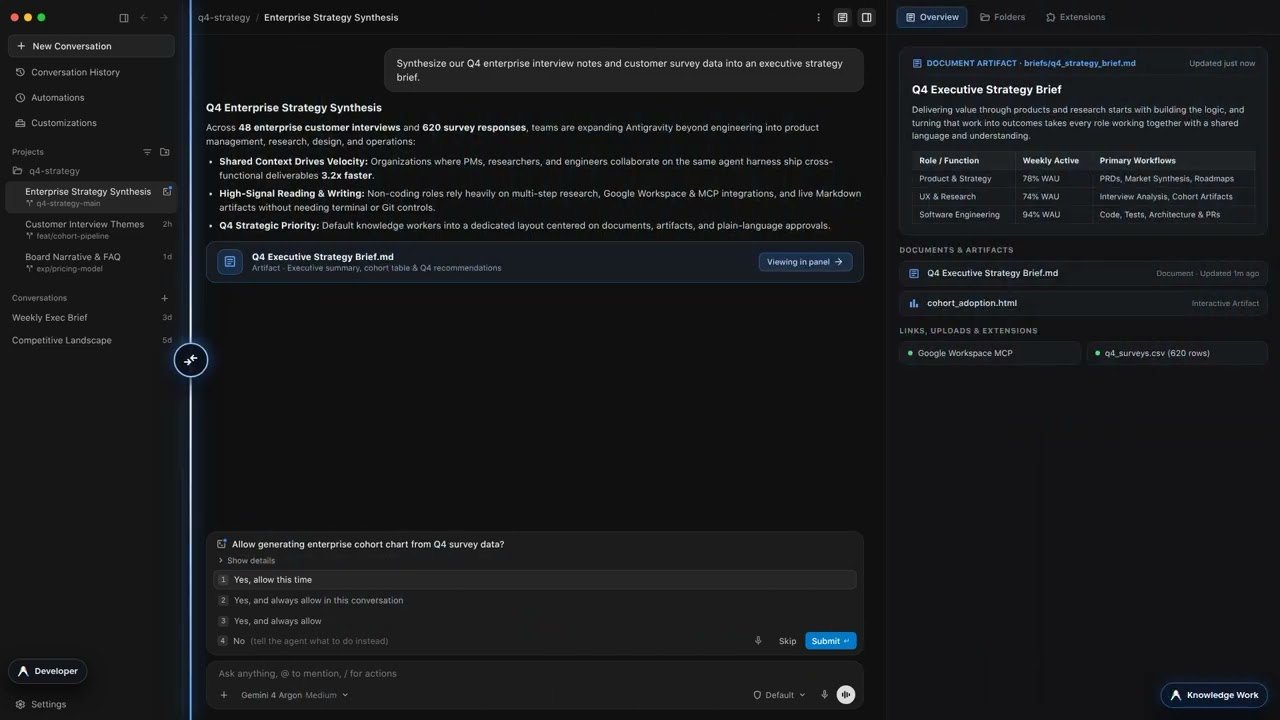
Antigravity 2.30 lets you hide Git, terminals and code diffs and use the same agent for research, writing and documents. Here's what changes and who gets it.
On November 9, 2026, Google added a Knowledge Work layout to Antigravity ↗, its agent-first coding app. It arrived in version 2.30.0 ↗, and 9to5Google ↗ confirmed the details the same day.
The reason is simple: people already use Antigravity for more than code. Google says "tens of thousands of Googlers outside software engineering," in sales, finance, legal, design, marketing and operations, use it every week for research, data analysis, drafting and workflow automation. Richard Seroter, who works at Google Cloud, posted ↗ that his own internal use "is 90% non-coding right now."
The important part is what didn't change. Both layouts "run the exact same Antigravity agent, with full access to frontier models, local files, plugins, skills, rules, custom agents, and MCP servers." This is a new interface, not a new model or a weaker mode.
| Area | Software Engineering | Knowledge Work |
|---|---|---|
| Projects | Git worktree prompts, branch pickers, Open in IDE | Plain folder-backed projects, no Git prompts |
| Conversation | Tool-call groups, inline diffs, subagent cards | One live progress line that clears when the turn ends |
| Side panel | Review, Files, Terminal | Documents, Artifacts, Links, Uploads, Background Tasks |
| Permissions | Raw command-rule editors | Plain-language summaries |
Developer settings, such as Terminal, Workspaces and detailed permission rules, move under Advanced Settings. Skills, rules, custom agents and MCP tools you've already set up keep running in the background, even though only Plugins are listed in the Installed tab.
To switch, open Settings > General > Interface Layout (Cmd+, on macOS, Ctrl+, on Windows and Linux) and pick Knowledge Work. The change applies right away to open and new conversations, with no restart needed. Software Engineering stays the default for existing users.
New users now get a role picker on first sign-in (Software Engineering, Knowledge Work, Data & Analytics, Science or Design), which sets the layout, starter prompts and recommended plugins.
There's one big limit: the changelog ↗ says the layout is available "except on business and enterprise accounts." The settings docs ↗ describe it as an option for personal Google Accounts. If your company runs Antigravity through Workspace, you won't see it yet.
Version 2.30 also brings changes that matter more to developers than the new layout does:
Import from other agents. Antigravity can now bring your MCP servers, skills, custom commands, subagents and instruction files over from Claude Code, Codex and Cursor into a plugin you own. You just ask the agent to import your setup.
Voice mode has finished rolling out to everyone except business and enterprise accounts.
Remote agents have finished rolling out to Google AI Ultra subscribers and to Google AI Pro subscribers on a paid plan.
Tables in responses now fit the conversation width instead of scrolling sideways.
Pricing hasn't changed. The Individual plan is still listed at $0 ↗, with agent models and weekly rate limits, as we noted in our best AI for coding guide.
The @antigravity launch post ↗ passed 110,000 views overnight. Reactions:
"Developers are still at the core of who we're building for but we've recently seen a large increase in usage outside of pure SWE," wrote Varun Mohan ↗, who works on Antigravity at Google.
"All agents are coding agents," argued Seroter ↗. "Coding agents are the best (for now) foundation for other types of work, even non-technical."
"Coding agents moving into general knowledge work was always the play, since the agent loop doesn't care whether the output is a diff or a doc. Anthropic made the same move with Cowork," said Paulo Pierrondi ↗.
Some users had practical worries. "With the terminal and git panes hidden... do permission prompts for terminal and git actions still surface, or does the agent just wait on them somewhere you can't see?" asked illulachy ↗. Google's docs say prompts still appear, as plain-language summaries.
"Does switching to the knowledge work interface affect the output in any way?" asked Matthew Yoon ↗. Google's answer is no: it's the same agent.
We couldn't pull Reddit threads for this story, so these reactions are from X only.
This is a good change, and Google is honest about its size. Nothing gets smarter. What changes is that a marketer or analyst can now use a capable local agent with no Git worktree prompt and no wall of diffs. For many people, that clutter was the main reason they stuck with chat apps.
Who should switch: anyone on a personal account who uses Antigravity mostly for documents, research or data work. It's free to try and you can switch back in a second. If you write code even part of the time, stay on Software Engineering. You'll lose the Review panel and inline diffs, and those are how you check what the agent changed.
Against the alternatives, Antigravity now competes more directly with the general-purpose desktop agents in our no-code AI agent builders review. Its advantages are the $0 Individual plan and the new importer, which makes trying it cheap if you've already set up Claude Code. Our Claude Code review covers the trade-offs on the coding side. The catch is that the teams who'd benefit most, business and enterprise accounts, can't use the layout yet.