AI News · 5 min read
Signal Blocks Screenshots to Stop Siri AI and Gemini Agents
Signal now blocks screenshots on iOS 27 and on Android when an AI assistant reads the screen. What changes, how to switch it off, and the Mac gap.
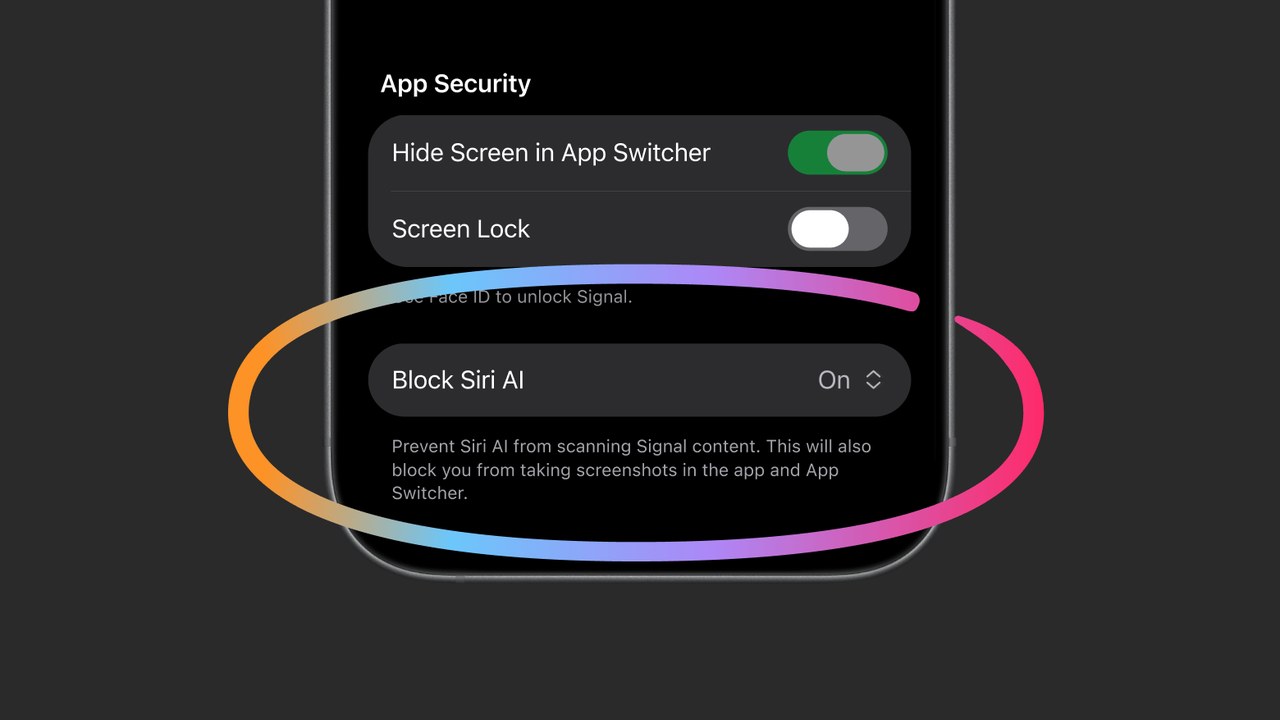
Signal now blocks screenshots on iOS 27 and on Android when an AI assistant reads the screen. What changes, how to switch it off, and the Mac gap.
On November 20, 2026, Signal president Meredith Whittaker published Signal is Serious About Protecting Your Privacy ↗. Signal says it is "restricting the latest AI agents built into mobile operating systems from potentially capturing and storing your Signal data." The tool is screenshot blocking: on iOS 27, and on Android when Signal detects an AI assistant trying to read the screen. Reuters ↗ (Katie Paul) had the story first, and The Verge ↗ (Jess Weatherbed) and Fast Company ↗ covered it the same day. The lead image is Signal's own screenshot of the new iOS setting, from that blog post, used for news reporting; credit Image: Signal. We have not used the new setting.
Signal names two system agents: Google's "Gemini Intelligence with Google Gemini" and Apple's "Onscreen Awareness with Siri AI." It says these agents "scan" what is on screen, so your messages leave Signal and go to "whatever local database or remote server an OS-level AI agent is using at that moment." Signal calls that "an existential threat to Signal." It is the same move Signal made against Microsoft Recall last year, when Signal Desktop started blocking screenshots on Windows 11 by default.
Reuters reports that the new restrictions are on by default. Users get pop-ups with an option to turn the block off, either when Signal detects a screenshot attempt or when an AI assistant tries to access the screen, depending on the device.
| Platform | What Signal does | Setting |
|---|---|---|
| iOS 27 | Blocks screenshots in app | Block Siri AI |
| Android | Turns on when an AI reads the screen | Screen security |
| macOS | Cannot block reliably | Exclude in Siri settings |
| Windows 11 | Blocks screenshots (since 2025) | Screen security |
On iOS, the new option in Signal's screenshot reads "Prevent Siri AI from scanning Signal content. This will also block you from taking screenshots in the app and App Switcher." On Android, Signal's screenshot shows Screen security switched on with the line "This will also prevent some AI assistants such as Google Gemini from scanning Signal content."
Android works differently for a reason. Signal's footnote says many Android vendors give it no reliable way to see a screenshot attempt. Rather than let screenshots silently fail, Signal watches for an AI assistant reading the screen and then switches Screen security on by itself.
To switch it off, go to Signal's settings. Signal's support page ↗ puts Screen Security under Settings, then Privacy, and Signal's screenshots show the new switches in an App Security section. Signal warns that turning the block off will "potentially expose your (and your contacts') Signal content to these AI agents, and break our privacy guarantees." The support page adds a limit that has always been true: the setting stops screenshots on your own device only, not on the other person's phone.
On a Mac, Signal says it cannot block screenshots reliably, so Siri AI is not blocked there. Its advice for macOS 27 is to add Signal to the Excluded Apps list in System Settings, then Siri.
Signal calls its fix "incomplete." Blocking screenshots does nothing about agents that read files already on the device. It asks Apple, Google, and Microsoft for two things: an easy, documented way for an app to opt out of AI access (screen reading, file system, notifications, and APIs), and real documentation of how these agents handle data. It says it spent months on "forensic investigations" across Android and iOS to learn what the agents do.
Third-party agents are on the list too. Signal says agents "like Meta's Muse" use accessibility permissions as "a skeleton key." Reuters reported earlier this week that Muse reached Signal messages on an Android phone and an Apple laptop by going around its own Connector tool. Reuters adds that an Apple update this week closed that macOS path but added a new set of agent permissions with extra warnings. Meta told Reuters that agents need to see and use the computer to work, and that Muse reaches other apps only through permissions users grant. Our Muse privacy note has the earlier report.
"Encryption was not broken. It was bypassed by the helpful assistant." — Hajrë Hyseni ↗ (@hajra)
"Right now, there is NO standard opt-out." — Meet Shekhar ↗ (@0xShekhar)
"block siri ai on ios 27 stops screenshots inside signal but still misses macs." — Dominik ↗ (@EternitiesAI)
"Privacy tools will have to assume the OS itself is no longer trusted." — Jenvu ↗ (@itsjenvu)
Reddit was not reachable for this story.
Leave the block on unless screenshots are part of your job. The cost is real but small: you lose screenshots of your own Signal chats. What you keep is the thing Signal exists for. If you need a screenshot for a receipt or a bug report, turn it off for that moment and back on after.
If you use a screen-reading agent, expect it to go blind on Signal. That is the point. Gemini on Android, Siri AI on iOS 27, and third-party agents that read the screen should not see your chats, so any chore that depends on reading Signal off the screen will fail there. Our Gemini computer use on Mac note shows how much screen access the new agents ask for.
Mac users have homework. Signal cannot protect you there yet. Do the Siri exclusion step yourself.
Watch Apple and Google, not Signal. Signal says it is "cautiously optimistic" that both are talking to it. A real opt-out API would help every private app, not just this one. If you are choosing an assistant with privacy in mind, our ethical ChatGPT alternatives guide and ChatGPT vs Claude vs Gemini compare the main options.
Verdict: a sensible default with an honest disclaimer. Keep it on, fix the Mac setting by hand, and treat any agent with screen or accessibility access as a reader of everything on your screen.