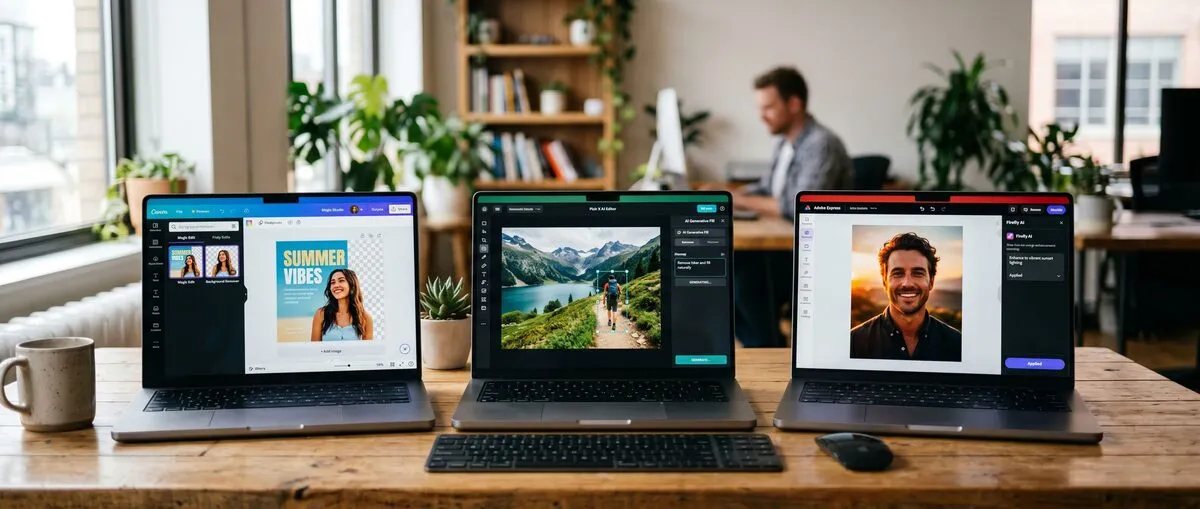
Free AI photo editors such as Canva, Pixlr, Fotor, Adobe Express and Google Photos now bundle generative tools like background removal, object erasing and generative fill into their free tiers, each with its own limits on credits, saves or export quality.
What is the current landscape of free AI photo editors in 2026?
Free AI photo editors in 2026 combine traditional adjustments with generative AI features, but every free tier is capped somehow: by AI credits, monthly saves, export resolution, ads or watermarks. The right choice depends on which of those limits matters least for your workflow.
Canva offers a limited set of Magic Studio AI tools on its free plan. Pixlr's browser editor bundles AI tools such as generative fill, object removal and background removal, with an ad-supported free tier. Fotor's free Basic plan includes limited free AI credits and standard-resolution exports. Picsart offers AI editing in its free app, with Pro and Ultra subscriptions for more. Adobe Express with Firefly includes free daily generations. Google Photos Magic Editor gives Android and iOS users 10 saves per month. Remove.bg removes image backgrounds automatically for free on its website. Let's Enhance gives 10 free credits at signup for upscaling. VanceAI offers restoration and denoising tools with credit-based plans. Microsoft Designer offers AI image generation and editing with a Microsoft account.
Recent generative features include object removal, generative fill and expand, and AI upscaling. Google expanded Magic Editor beyond Pixel phones to all Google Photos users on Android and iOS in 2024, per Google's announcement ↗. Adobe positions its Firefly models as trained on licensed content, such as Adobe Stock, and public-domain content.
When comparing tools, look at the free-tier limits published on each vendor's pricing page, which features are generative versus traditional, and whether an API or mobile app fits your workflow.
These editors support creative edits for social media and everyday photo cleanup.
This guide is based on vendor documentation and pricing pages checked in September 2026. It does not report its own speed or accuracy measurements.
What makes a top free AI photo editor?
A good free AI photo editor combines useful AI features, a free tier with workable limits, and integration with the apps and devices you already use. Generative editing creates new content with AI, while traditional editing adjusts what is already in the photo.
Key Features to Evaluate
Free-tier limits matter more than raw speed for most users. Check how many AI credits or saves you get, the maximum export resolution, and whether exports carry watermarks or the app shows ads. For example, Let's Enhance's free tier upscales to 8 megapixels and adds a watermark, while its paid plans remove it (pricing as of September 2026 ↗).
Feature quality varies by task. Background removal, object erasing and upscaling are mature features in most tools. Generative fill and object replacement can produce artifacts or hallucinated details, so check results closely before publishing.
Workflow integration depends on where you edit. Google Photos works inside the Android and iOS photo library. Adobe Express connects to the Adobe ecosystem. Remove.bg offers an API for automated background removal. Canva focuses on design templates and team collaboration. Pixlr runs in the browser without installs.
Generative vs. Traditional Editing Explained
Generative editing creates new content with AI models. Pixlr offers generative fill, expand and transform tools. Picsart includes AI replace tools for swapping objects. Adobe Express generates images and fills with Firefly.
Traditional editing adjusts existing elements. Fotor applies filters, retouching and batch edits. Canva enhances photos inside templates. Google Photos also offers conventional adjustments alongside Magic Editor.
Generative editing speeds up creative tasks like adding or replacing objects, but outputs can contain errors that need review. Traditional editing gives full manual control but takes more steps.
Use generative editing for creative content and traditional editing when accuracy matters, for example in product or documentary photos. Free tier limitations differ: Pixlr's free tier is ad-supported, Fotor's free exports are standard resolution, Picsart reserves more AI usage for paid plans, and Let's Enhance watermarks free results. Batching work helps you get the most from limited credits.
Privacy policies differ. Adobe says Firefly is trained on licensed and public-domain content. Remove.bg is a Canva brand. Google Photos Magic Editor edits photos in your Google Photos library. Read each privacy policy before uploading sensitive images.
For background removal, dedicated tools like Remove.bg are an alternative to doing the job manually in Photoshop.
What are the top free AI photo editors?
Top free AI photo editors include Canva for templates, Pixlr for browser-based editing, and Adobe Express for Firefly generations, each offering core features like fills and enhancements with limits on credits, exports or ads. Remove.bg and Google Photos Magic Editor cover narrower tasks well.
Canva Magic Studio
Canva Magic Studio groups Canva's AI tools. The free plan includes a limited selection of them, and Canva Pro unlocks the full set along with premium templates and assets. The main differentiator is design: Magic Design builds layouts from your content.
Integration ties into Canva's design and team collaboration features. Some AI tools and premium elements are available only in paid plans.
Pixlr AI Editor
Pixlr AI Editor offers AI tools like cutouts, generative fill and object removal in a free, ad-supported browser editor. As of September 2026, paid plans start at $2.49/month (Plus) and Premium costs $9.99/month, or $7.99/month billed yearly, per Pixlr's pricing page ↗. Its differentiator is a Photoshop-like interface in the browser.
Browser access suits quick workflows. Paid plans add ad-free editing and more AI credits.
Fotor AI Photo Editor
Fotor AI Photo Editor delivers one-click retouching and AI tools in its free Basic plan, which includes limited free credits and standard JPG/PNG/PDF exports. Paid plans (Pro, Pro+ and Max) add HD exports, ad-free and watermark-free use, and more credits. Its differentiator includes AI art effects and batch editing.
Fotor runs on the web, Windows, Mac, iOS and Android. API plans are available.
Picsart AI Photo Editor
Picsart AI Photo Editor includes AI tools such as replace and background removal in its free app. Pro and Ultra subscriptions expand access. Its differentiator is a large creative community and template library.
Picsart also offers developer APIs.
Adobe Express with Firefly AI
Adobe Express integrates Firefly AI for generative fills and text-to-image. The free plan includes free daily generations, and Premium includes 250 generative credits per month (as of September 2026). Its differentiator is Firefly, which Adobe says is trained on licensed and public-domain content.
It connects well to other Adobe tools such as Photoshop.
For generative comparisons, see our ChatGPT image generation guide on creative outputs.
Google Photos Magic Editor
Google Photos Magic Editor uses generative AI for complex edits like repositioning a subject or changing the sky. All Google Photos users on Android and iOS get 10 Magic Editor saves per month. Unlimited use requires a Pixel device or a Premium Google One plan (2TB and above), per Google's April 2024 announcement.
Magic Editor works inside the photo library you already use, with no separate app.
Remove.bg specializes in background removal and is free to use on its website. Paid credits and plans unlock full-resolution downloads and API use. The API charges 1 credit per full-resolution image, per its API documentation ↗.
Let's Enhance upscales images, with 10 free credits at signup (1 image = 1 credit). The Starter plan costs $9/month billed annually ($12 monthly) for 100 credits a month, as of September 2026. Free results carry a watermark.
VanceAI Photo Restorer is part of VanceAI's web tools, which include restore, denoise, upscale and colorize. It uses credit-based paid plans and also offers a free lightweight desktop client.
Microsoft Designer offers AI image generation and editing, such as restyling and generative erase, with a Microsoft account. Usage limits depend on your Microsoft plan.
Free-tier limits change often, so check each vendor's pricing page before relying on them.
How do free AI photo editors compare on free limits, features, and integration?
Free tiers differ most in how they cap usage: Google Photos caps Magic Editor saves, Let's Enhance and Fotor use credits, and Pixlr is ad-supported. Integration is strongest in Google Photos for phone photo libraries and in Adobe Express for the Adobe ecosystem.
Free Tier Comparison
| Tool | Free tier (as of September 2026) | Main AI strength | Source |
|---|
| Pixlr AI Editor | Free, ad-supported; paid from $2.49/month | Browser editing, generative fill | Pixlr pricing page |
| Canva Magic Studio | Limited AI tools on the free plan | Design templates, Magic Design | Canva |
| Remove.bg | Free background removal on the website | Background removal, API | remove.bg |
| Google Photos Magic Editor | 10 saves/month (Android/iOS, non-Pixel) | Generative object moves, sky edits | Google blog, April 2024 |
| Fotor AI Photo Editor | Limited free credits, standard-res exports | Retouching, batch editing | Fotor pricing page |
| Adobe Express with Firefly AI | Free daily generations | Firefly generative fill | Adobe Express pricing page |
| Picsart AI Photo Editor | Free app; Pro and Ultra paid plans | AI replace, community templates | Picsart pricing page |
| Let's Enhance | 10 free credits at signup, watermarked | Upscaling to 8MP free | Let's Enhance pricing page |
| VanceAI Photo Restorer | Credit-based plans | Restoration, denoising | VanceAI pricing page |
| Microsoft Designer | Free with a Microsoft account | Generation, restyling | Microsoft |
Pixlr suits quick single edits in the browser. Fotor adds batch editing.
Feature Accuracy Notes
Upscalers like Let's Enhance and VanceAI can add artifacts on heavily compressed images. Background removers struggle most with hair, fur and transparent objects. Generative tools like Firefly fills and Picsart's AI replace can hallucinate details. Filters and manual adjustments are predictable because they do not generate new content.
None of these vendors publishes independent accuracy benchmarks for their free tiers, so try your own images before committing.
Workflow Integration for Generative Editing
Google Photos integrates with Android and iOS photo libraries. Adobe Express links to other Adobe apps. Remove.bg offers an API for bulk background removal. Canva supports team collaboration. Microsoft Designer ties to Microsoft accounts and apps.
For text-to-image workflows, our Midjourney alternatives guide covers dedicated image generators.
What recommendations exist for buyers of free AI photo editors?
Choose Canva for design-led and collaborative edits, Pixlr for a full editor in the browser, and Google Photos for quick edits inside your phone's photo library. Use Remove.bg's API if you need automated background removal.
Best for Generative Edits
Adobe Express with Firefly AI suits generative work thanks to its free daily generations. Picsart AI Photo Editor handles creative replacements. Pixlr AI Editor offers generative fill, expand and transform in the browser.
Actionable advice: Use Adobe if licensed training data matters to you. Use Picsart for social media content.
Best for Traditional Enhancements
Fotor AI Photo Editor handles retouching, filters and batch edits. Canva enhances photos within templates. Google Photos covers everyday adjustments on your phone.
Choose Fotor for portrait retouching. Opt for Canva in team settings.
Overall Top Pick
Pixlr AI Editor is a strong all-round free choice because it combines traditional editing and generative tools in the browser without an install. Developers who need automation can use Remove.bg's API.
Cost-benefit: free tiers cover occasional editing; upgrades like Pixlr Premium ($9.99/month, or $7.99/month billed yearly, as of September 2026) make sense for heavy AI use.
For developer experiments, our ComfyUI Tutorial for Beginners 2026 extends to custom AI editing workflows.
How can you elevate your edits with the best free AI photo editor?
Use Pixlr for browser-based generative edits or Adobe Express for Firefly fills, Remove.bg for background removal, and Canva for templates. Check pricing pages regularly, because free-tier limits change often.
Match the tool to the job: Pixlr and Adobe Express for generative work, Let's Enhance or VanceAI for upscaling and restoration, and Google Photos for quick phone edits.
Try Google Photos Magic Editor first if your photos already live there.
Free-tier limits and features change often, so recheck each vendor's pricing page before you commit.
Frequently Asked Questions
What is the best free AI photo editor for generative editing in 2026?
Adobe Express with Firefly AI is a strong choice for generative fills, with free daily generations on the free plan. It suits people who want generative tools backed by a model Adobe says is trained on licensed content.
How do free tiers of AI photo editors compare in speed?
Speed depends on the task, image size and server load, and vendors do not publish comparable speed figures. Browser-based tools like Pixlr work well for quick edits without installing anything.
Are there limitations in free AI photo editors?
Yes. Common limits include credit caps (Let's Enhance: 10 free credits at signup), monthly save limits (Google Photos Magic Editor: 10 per month on non-Pixel devices), standard-resolution exports (Fotor) and ads (Pixlr). Paid plans start at $2.49/month for Pixlr Plus (as of September 2026), but free tiers suffice for basic editing.
Which free AI photo editor integrates best with workflows?
Google Photos Magic Editor integrates natively with Android and iOS photo libraries. For developer workflows, Remove.bg's API supports automated background removal.
Generative vs. traditional AI editing: Which is better for beginners?
Generative editing (e.g., Picsart's AI replace) is more intuitive for creative tasks like object addition, while traditional editing (e.g., filters and retouching in Fotor) offers precise control. Start with generative tools for quick enhancements.
What are the ethical considerations in free AI photo editors?
Adobe says Firefly is trained on licensed and public-domain content, while many other generators do not disclose their training data. Always check privacy policies, especially for cloud-processed tools, before uploading personal or client photos.
Sources