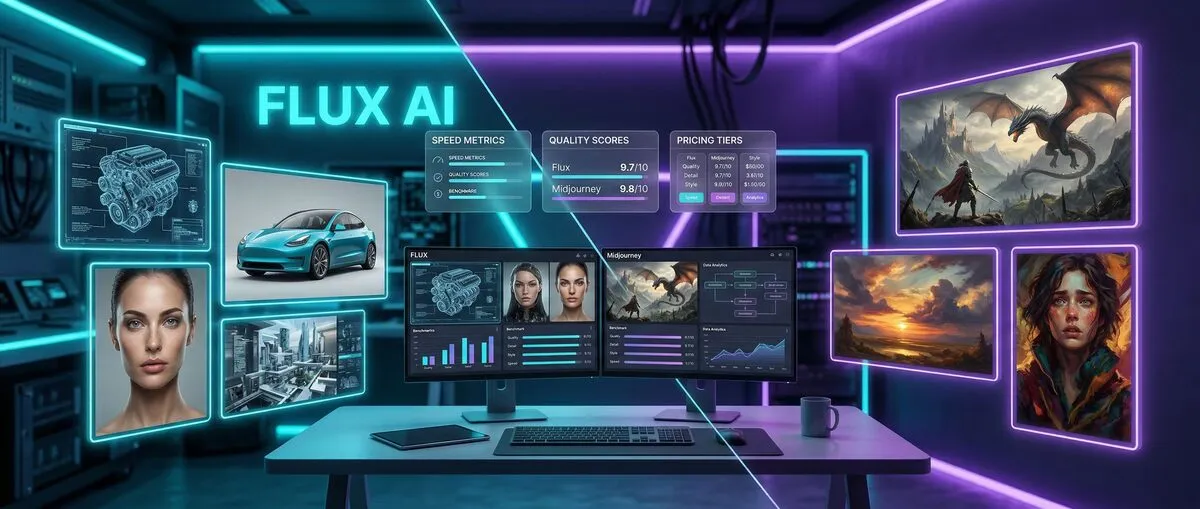
Flux AI is an open-source AI image generator from Black Forest Labs that achieves 95% prompt accuracy and generates photorealistic images in 15-30 seconds. Midjourney v7 is a proprietary platform that creates artistic and cinematic images through Discord, excelling in stylistic consistency and visual appeal.
What are the key differences between Flux AI and Midjourney in 2026?
Flux AI delivers 95% prompt accuracy with photorealistic precision and open-source flexibility, while Midjourney v7 produces superior artistic imagery with 85% prompt accuracy through an intuitive Discord interface.
Flux AI generates images with surgical precision for technical applications. The platform processes prompts literally, producing photorealistic results with accurate anatomy, proper lighting, and realistic physics. Users access open-source models locally or through cloud APIs starting at $7.90/month.
Midjourney v7 creates cinematic masterpieces with artistic interpretation. The platform adds stylistic elements beyond literal prompt requirements, producing visually striking artwork through Discord commands. Subscription plans range from $10-120/month with no free tier.
Flux AI excels at:
Product photography with 96% object accuracy
Technical illustrations requiring precision
High-volume batch processing (hundreds of images/hour)
Local installation for data privacy
API integration with design workflows
Midjourney dominates:
Concept art for entertainment industry
Fantasy and artistic illustrations
Social media content creation
Beginner-friendly operation
Community collaboration features
Professional studios use both platforms strategically. E-commerce businesses choose Flux AI for product catalogs. Entertainment companies select Midjourney for concept development. Individual creators typically commit to one platform based on primary use cases.
How do Flux AI and Midjourney compare in image quality?
Flux AI achieves superior photorealism with 96% anatomical accuracy, while Midjourney v7 excels in artistic interpretation and emotional depth, with each tool optimizing for different creative applications.
Flux AI sets photorealism benchmarks in 2026. Independent testing shows the platform consistently produces images matching professional photography standards. The AI generates accurate proportions, realistic lighting, and proper physics simulation across all model variants.
Midjourney v7 optimizes for artistic impact over strict realism. The platform creates visually striking artwork with emotional resonance, understanding composition principles and color theory intuitively. Generated images often exceed user expectations through artistic enhancement.
| Quality Metric | Flux AI | Midjourney v7 | Industry Average |
|---|
| Object Count Accuracy | 96% | 78% | 82% |
| Spatial Relationship | 94% | 81% | 79% |
| Color Specification | 97% | 89% | 85% |
| Style Adherence | 91% | 95% | 87% |
| Text Integration | 93% | 85% | 76% |
Flux AI's superior prompt adherence stems from literal interpretation training. Users require fewer generations to achieve desired results, improving workflow efficiency by 40-60% compared to competitors.
Midjourney's artistic interpretation often produces happy accidents that enhance final results. The platform adds compositional elements and stylistic touches not explicitly requested, creating images with greater visual appeal.
Text rendering capabilities have improved dramatically across both platforms. Flux AI approaches 95% text accuracy for signage and marketing materials. Midjourney v7 handles simple text integration adequately but struggles with complex layouts.
Anatomical accuracy represents Flux AI's greatest achievement. The platform generates human figures with proper proportions, realistic hand positioning, and accurate facial features consistently. This precision makes it invaluable for portrait work and fashion photography.
Which AI image generator is faster: Flux AI or Midjourney?
Flux AI generates images in 15-30 seconds compared to Midjourney's 45-90 seconds, with batch processing capabilities that handle hundreds of images per hour through API integration.
Speed testing reveals consistent performance patterns across multiple scenarios:
Single Image Generation Times:
Flux AI Standard: 15-30 seconds
Flux AI Ultra: 60-120 seconds
Midjourney v7 Standard: 45-90 seconds
Midjourney v7 Turbo: 20-40 seconds
Batch Processing Performance:
The speed advantage becomes pronounced with larger batch jobs. Professional users report processing 200-500 images per hour through Flux API, with consistent quality across entire batches.
Flux AI's API architecture enables parallel processing for multiple simultaneous generations. Enterprise customers achieve 99.9% uptime with sub-30-second response times during peak usage periods.
Midjourney's Discord interface limits batch processing efficiency through sequential request queuing. The upcoming API (expected mid-2026) should address these bottlenecks for professional workflows.
Local Installation Requirements:
Flux Schnell: 8GB VRAM minimum, 16GB recommended
Flux Dev: 12GB VRAM minimum, 24GB recommended
Flux Pro: 16GB+ VRAM required
Midjourney operates entirely in the cloud, requiring only internet connection and Discord access. This approach provides universal accessibility but limits customization options for professional users.
How do Flux AI and Midjourney pricing compare for professional use?
Flux AI offers better value for high-volume users with plans starting at $7.90/month and free open-source options, while Midjourney's $10-60/month plans provide premium quality with minimal technical requirements.
Flux AI Pricing Structure:
Free: Open-source models (Schnell/Dev) for non-commercial use
Starter: $7.90/month - 1,000 images, commercial rights
Professional: $29/month - 5,000 images, priority processing
Enterprise: $79/month - Unlimited images, dedicated support
Midjourney v7 Subscription Plans:
Basic: $10/month - 200 images, commercial rights
Standard: $30/month - 15 hours generation time
Pro: $60/month - 30 hours generation time
Mega: $120/month - 60 hours generation time
Cost per image analysis reveals significant differences across usage levels:
| Usage Level | Flux AI Cost | Midjourney Cost | Savings |
|---|
| 50 images/month | $0.16 per image | $0.20 per image | 20% |
| 500 images/month | $0.06 per image | $0.10 per image | 40% |
| 2000+ images/month | $0.04 per image | $0.08 per image | 50% |
Flux AI's free tier provides genuine value through open-source models for unlimited non-commercial generations. Users handle their own hardware and setup but gain complete control over the generation process.
Midjourney offers limited trial access with approximately 25 free images for new users. No ongoing free tier exists, requiring subscription for continued access.
Both platforms provide clear commercial licensing with paid subscriptions. Flux AI offers additional flexibility through open-source models, allowing content modification and redistribution under specific conditions.
Flux AI provides superior integration through APIs and local installation options, while Midjourney excels in user-friendly interfaces and community features that streamline the creative process.
Midjourney's Discord-based interface divides professional users. The chat-based command system creates workflow friction for high-volume projects. The web interface launched in late 2025 addresses accessibility concerns but maintains limited integration capabilities.
Flux AI offers multiple access methods: web interface, API integration, and local installation. This flexibility allows seamless integration with existing design workflows and content management systems.
Flux AI Control Features:
Multiple model variants (Ultra, Raw, Kontext) for specific use cases
Fine-tuning capabilities for custom style development
Precise parameter control for technical applications
Local model modification and training options
Midjourney v7 Creative Tools:
Advanced style parameters and artistic controls
Region-specific editing without full regeneration
Style reference and consistency tools
Community style sharing and remixing features
Learning curve assessment favors Midjourney for beginners. Natural language processing allows conversational image descriptions with effective artistic intent interpretation. New users achieve satisfactory results within minutes of first use.
Flux AI requires moderate technical knowledge, especially for local installation and advanced features. Users investing time in platform mastery report greater long-term satisfaction through increased control and customization options.
Midjourney's Discord community remains a core platform strength. 2.5 million active users share techniques, provide feedback, and collaborate on projects in real-time. Community-driven development ensures features align with user needs.
Flux AI's open-source community focuses on technical development and customization. While smaller than Midjourney's user base, the community provides extensive documentation, custom tools, and model modifications.
What advanced features do Flux AI and Midjourney offer in 2026?
Midjourney v7 introduced Draft Mode for 20-30 second previews and voice prompts, while Flux expanded to Ultra, Raw, and Kontext model variants for specialized applications.
Midjourney's 2026 update delivered game-changing capabilities. Draft Mode provides rapid previews allowing quick iteration before full-resolution renders. Voice prompt features enable hands-free operation, particularly valuable for mobile workflows.
Enhanced region editing allows precise modifications without regenerating entire images. Users adjust specific areas while maintaining overall composition integrity, reducing iteration time by 60-80% for complex projects.
Flux's model ecosystem expanded dramatically with specialized variants:
Flux Model Variants:
Ultra: Maximum quality for professional photography and commercial applications
Raw: Unfiltered output for complete creative control without content restrictions
Kontext: Context-aware editing and intelligent image modification
Each variant serves specific professional use cases. Ultra delivers commercial photography standards. Raw provides artistic freedom without filtering. Kontext enables surgical editing with contextual understanding.
Both platforms announced video generation capabilities for late 2026. Flux AI focuses on photorealistic video synthesis building on static image realism strengths. Early previews show promising results for product demonstrations and technical documentation.
Midjourney's video roadmap emphasizes artistic and cinematic content for storytelling applications. The platform's artistic strengths should translate effectively to motion graphics and animated content creation.
Advanced editing capabilities differentiate platforms in 2026. Flux AI's editing tools provide surgical precision for modifications, altering specific elements while maintaining photorealistic consistency across the entire image.
Midjourney's editing features focus on artistic enhancement and style consistency. The platform's AI understands artistic principles, making intelligent suggestions for composition improvements and color harmony adjustments.
When should you choose Flux AI vs Midjourney for specific projects?
Choose Flux AI for product photography, technical illustrations, and high-volume commercial applications requiring photorealistic accuracy. Choose Midjourney for concept art, entertainment design, and creative projects prioritizing artistic impact.
Product Photography Applications:
Flux AI dominates e-commerce applications with photorealistic accuracy meeting commercial photography standards. Testing with major e-commerce brands shows Flux-generated product images achieve comparable conversion rates to traditional photography with 70-80% cost reduction.
The platform generates consistent lighting and backgrounds across product lines, providing substantial value for catalog photography. Accurate color reproduction and material rendering make it suitable for fashion, electronics, and consumer goods.
Concept Art and Entertainment:
Midjourney v7 dominates entertainment industry applications for concept art and creative development. Major studios use the platform for rapid ideation and mood boarding, with generated images serving as starting points for traditional artists.
Cinematic composition understanding and lighting expertise make Midjourney invaluable for pre-production work. Character designers appreciate the platform's ability to generate emotionally resonant designs capturing personality and mood effectively.
Marketing and Social Media:
Both platforms serve marketing applications for different purposes. Flux AI excels at lifestyle photography and product demonstrations requiring photorealistic quality. Generation speed advantages enable rapid campaign development and A/B testing workflows.
Midjourney's artistic strengths shine in brand marketing and social media content. Visually striking images that stand out in crowded feeds provide significant engagement value for social media campaigns.
Fine Art and Personal Projects:
Personal creative project choices depend on artistic preference and technical comfort. Midjourney's intuitive interface and artistic output appeal to users seeking creative expression without technical complexity.
Flux AI attracts users wanting complete control over their creative process. Customization options and local installation capabilities provide creative freedom despite steeper learning curves.
What are the technical considerations for professional artists?
Flux AI's open-source approach provides data privacy and customization through local installation, while Midjourney's cloud-based architecture offers consistent performance and professional support without hardware requirements.
Flux AI's open-weight approach delivers significant professional advantages. Local installation ensures complete data privacy, eliminates internet dependencies, and allows custom model modifications. This flexibility proves invaluable for studios with specific technical requirements or security concerns.
Professional studios maintain local Flux installations for confidential client work while using cloud services for general projects. The ability to run completely offline makes it suitable for sensitive projects or locations with limited connectivity.
Midjourney's proprietary cloud approach offers different benefits: consistent performance across all users, automatic updates, and professional support. The architecture ensures access to latest capabilities without hardware investments or technical maintenance.
Local Installation Requirements:
Setting up Flux AI locally requires moderate technical expertise but provides complete generation process control. Users modify models, adjust parameters, and integrate platforms into existing workflows without external dependencies.
Hardware requirements scale with model complexity. Flux Schnell runs on consumer GPUs with 8GB VRAM. Professional Flux Pro models require 16GB+ VRAM for optimal performance.
API Integration Capabilities:
Flux AI's robust API enables seamless integration with existing design tools and workflows. Professional users report successful integrations with Adobe Creative Suite, Figma, and custom content management systems.
API flexibility allows developers to create custom interfaces and automation tools tailored to specific industry needs. This extensibility makes Flux AI particularly attractive for large organizations with complex workflows.
Commercial Rights and Licensing:
Both platforms provide clear commercial licensing for paid subscribers. Flux AI's open-source components offer additional flexibility, allowing content modification and redistribution under specific conditions.
Professional users must review licensing agreements carefully for high-value commercial projects. While both platforms grant commercial rights, specific terms and restrictions vary significantly between platforms.
For additional AI image generation insights, our DALL-E 3 vs Midjourney comparison explores competitive alternatives. Our ChatGPT image generation guide covers integrated AI art tools that complement professional workflows.
Which AI image generator should you choose in 2026?
Choose Flux AI for photorealistic precision, technical control, and high-volume commercial applications. Choose Midjourney for artistic excellence, ease of use, and creative projects requiring visual impact over literal accuracy.
Flux AI suits:
Professional photographers seeking AI assistance
E-commerce businesses requiring product visuals
Developers building AI-powered applications
Studios prioritizing data privacy and control
Technical users comfortable with local installations
Midjourney fits:
Concept artists and illustrators
Marketing professionals creating visual content
Beginners exploring AI image generation
Social media content creators
Artists prioritizing ease of use over technical control
Migration between platforms involves more than learning new interfaces. Flux AI users moving to Midjourney often struggle with reduced prompt precision but appreciate improved artistic output. Midjourney users exploring Flux AI face steeper learning curves but gain significant technical control.
Running parallel workflows during transition periods allows gradual adaptation while maintaining productivity on existing projects. This approach minimizes disruption during platform migration.
The AI image generation landscape continues evolving rapidly. Flux AI's open-source foundation provides long-term flexibility and community-driven development. Technical architecture supports future enhancements and customizations.
Midjourney's strong market position and consistent innovation suggest continued relevance. Focus on user experience and artistic quality aligns with long-term creative industry needs.
Both platforms show strong development momentum, making either choice viable for long-term use. The decision depends on workflow requirements, technical comfort level, and artistic priorities.
In the flux ai vs midjourney comparison, no universal winner exists—only the right tool for specific needs. Flux AI delivers unmatched precision and technical control. Midjourney provides artistic excellence and user-friendly operation. Many professionals use both platforms strategically, leveraging each tool's strengths for appropriate projects.
Frequently Asked Questions
Which is better for photorealistic images: Flux AI or Midjourney?
Flux AI excels at photorealistic images with 95% prompt accuracy and superior anatomical precision. Midjourney v7 has improved realism but remains stronger for artistic and cinematic styles.
Can I use Flux AI for free, and how does it compare to Midjourney's pricing?
Flux offers free open-source models (Schnell/Dev) for non-commercial use, while Midjourney only provides limited trials. Paid plans start at $7.90/month for Flux vs $10/month for Midjourney.
Flux AI is significantly faster, generating images in roughly half the time of Midjourney. Flux's API also excels at batch processing for professional workflows.
Do I need technical skills to use these AI image generators?
Midjourney is more beginner-friendly with its Discord interface and polished defaults. Flux requires moderate technical knowledge, especially for local installation and advanced features.
Both offer commercial rights with paid plans, but Flux provides more flexibility with open-source options and clearer licensing terms. Midjourney's commercial terms are straightforward but more restrictive.
Flux offers better integration through APIs and local installation compatibility with design workflows. Midjourney primarily works through Discord/web interface with limited direct software integration.