AI Coding · 14 min read
Best AI Code Review Tools 2026: 10 Options Compared
An overview of ten AI code review tools and where they review code: pull requests, IDEs or CI/CD. Prices and availability are taken from vendor pages as of September 2026.
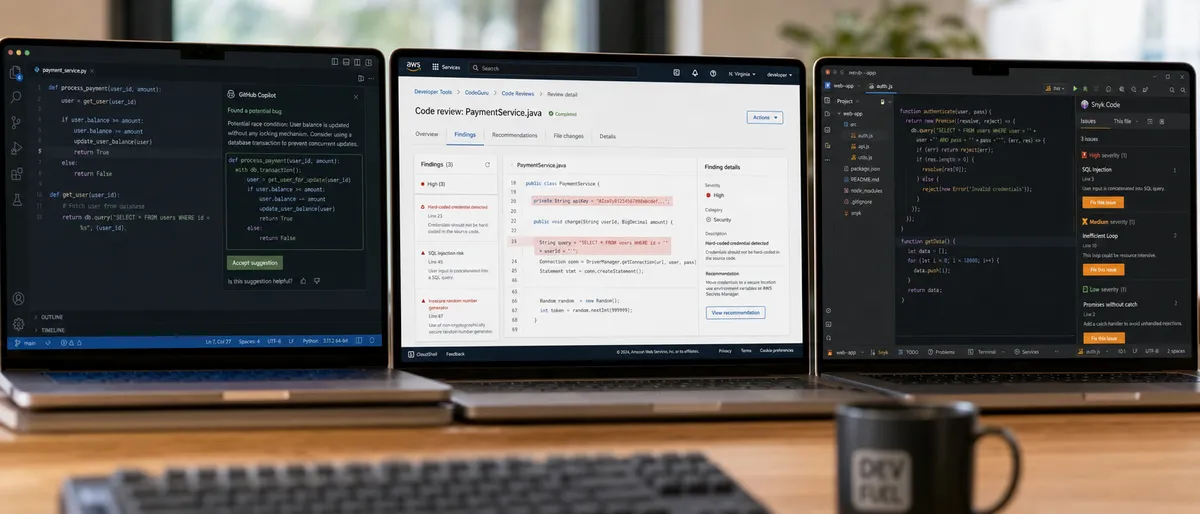
An overview of ten AI code review tools and where they review code: pull requests, IDEs or CI/CD. Prices and availability are taken from vendor pages as of September 2026.
AI code review tools automate bug detection, security scans, and style checks using static analysis and large language models. In 2026 they typically run in two places: as reviewers that comment on pull requests in GitHub or GitLab, and as IDE extensions that flag issues while you edit. They speed up routine checks but do not replace human reviewers.
AI code review tools analyze source code for errors and improvements. Teams use them to apply coding standards consistently across contributors.
Security-focused tools such as Snyk Code and Amazon Q Developer run static application security testing (SAST), looking for vulnerability patterns and exposed secrets. Style enforcement still relies on rules like PEP 8 for Python, which AI reviewers can check alongside logic issues.
PR reviewers post contextual comments directly on GitHub pull requests. Integrations with VS Code and JetBrains IDEs provide inline suggestions during editing.
This guide covers ten tools and product lines that offer AI-assisted code review. Prices and availability change often, so every price below is dated and should be checked on the vendor's site before you buy.
The tools below were chosen because each vendor documents a code review or code analysis capability, either on pull requests, in the IDE, or in CI/CD. Descriptions and prices come from each vendor's official documentation and pricing pages as of September 2026. This article did not run its own accuracy or speed tests, so it reports no accuracy, latency, or false-positive figures.
The main criteria were where the tool reviews code (PRs, IDE, CLI, or CI), which languages and source hosts it supports, and how it is priced.
Several products in this lineup have been renamed, restricted, or retired since 2023. Those changes are noted in each section.
Readers should verify current details on official sites. No sponsored placements are included.
The tools covered are GitHub Copilot code review, Amazon CodeGuru Reviewer, Google Gemini Code Assist, Snyk Code, Sourcegraph Cody, Cursor with Bugbot, Amazon Q Developer (formerly CodeWhisperer), GitHub Copilot Workspace, DeepSource, and Anthropic Claude. Two of these, CodeGuru Reviewer and Copilot Workspace, are no longer options for new projects, which is noted below.
GitHub Copilot, made by GitHub, includes Copilot code review ↗, which reviews pull requests and suggests fixes you can apply in a few clicks. As of September 2026 it is included in Copilot Pro ($10/month), Pro+ ($39/month), Business ($19 per seat/month), and Enterprise ($39 per seat/month), but not in Copilot Free.
Copilot code review comments on pull requests on GitHub.com. GitHub also documents it in the GitHub CLI, GitHub Mobile, VS Code, Visual Studio, Xcode, and JetBrains IDEs, with Azure DevOps in public preview.
GitHub says it looks for bugs, security vulnerabilities, style inconsistencies, and complex logic issues. Organizations can also enable it on pull requests from members without a Copilot license, billed as GitHub AI Credits.
Teams already on GitHub get the fastest setup because nothing extra needs to be installed.
For deeper comparisons, our Codex vs Claude Code comparison covers how an AI reviewer performs on real production changes.
Amazon CodeGuru Reviewer, from Amazon Web Services, uses program analysis and machine learning to find defects in Java and Python code, such as resource leaks and security issues. However, as of November 7, 2025, AWS no longer allows new repository associations ↗, so only existing users can keep using it.
CodeGuru Reviewer works with repositories on AWS CodeCommit, Bitbucket, GitHub, GitHub Enterprise, and Amazon S3 (through GitHub Actions). It can post recommendations inside pull requests.
It also includes a secrets detector that integrates with AWS Secrets Manager.
AWS now points teams to Amazon Q Developer for code reviews and to Amazon Inspector for code security scanning.
Google Gemini Code Assist is sold in Standard and Enterprise editions and works in VS Code, JetBrains IDEs, Android Studio, Cloud Shell Editor, and Cloud Workstations. As of September 2026, Google says the free individuals tier stopped serving requests on June 18, 2026, and points those users to Antigravity.
Gemini Code Assist offers code generation, explanation, and refactoring help inside the IDE.
A separate feature, Gemini Code Assist on GitHub, summarizes pull requests, posts code reviews, and responds to /gemini commands in PR comments.
Teams already on Google Cloud get the most from it, since the editions are managed through Google Cloud.
Explore more in our ChatGPT vs Claude vs Gemini comparison.
Snyk Code, made by Snyk, is an AI-based static application security testing (SAST) tool that runs in the Snyk web UI and PR checks, in JetBrains, VS Code, and Visual Studio plugins, in the Snyk CLI for CI/CD, and via API. As of September 2026, Snyk's Free plan includes 100 Snyk Code tests per month ↗, and the Team plan starts at $25/month with 1,000 tests per month for up to 10 developers.
Snyk Code scans for vulnerability patterns and shows fix guidance in the developer workflow.
Because it runs in the CLI, it fits into CI/CD systems such as GitHub Actions or Jenkins.
Larger organizations move to the Enterprise platform subscription, which uses custom, credit-based pricing.
Sourcegraph Cody is an AI coding assistant that uses Sourcegraph's code search for context across large repositories. As of September 2026, Sourcegraph's documentation lists Cody as supported on Sourcegraph Enterprise, and its pricing page lists Enterprise starting at $16,000 per year.
Cody runs in VS Code, JetBrains IDEs, Visual Studio, and the Sourcegraph web app.
Its strength is code search across many repositories, which helps when a change touches code owned by several teams.
Because it is sold as part of Sourcegraph Enterprise, it suits larger organizations rather than solo developers.
For pair programming options, check our guide to the best AI coding tools.
Cursor is an AI-native code editor. Its review product, Bugbot ↗, automatically reviews GitHub pull requests, comments on potential bugs, and offers fixes in the editor or through a background agent. As of September 2026, Cursor Pro costs $20/month, and Bugbot is billed on usage with a 14-day free trial.
Cursor also reviews code as you edit through its built-in chat and agent.
Cursor's other paid tiers are Pro+ at $60/month and Ultra at $200/month; Hobby is free with limited agent requests.
Solo developers and small teams who already use Cursor get review without adding a separate tool.
AWS CodeWhisperer is now part of Amazon Q Developer; the old CodeWhisperer page redirects to it. Amazon Q Developer includes code reviews covering SAST, secrets detection, dependency vulnerabilities (SCA), and code quality. As of September 2026, the Free tier costs $0 with 50 agentic requests per month, and Pro costs $19 per user per month.
Amazon Q Developer can review code in the IDE plugin and in GitHub and GitLab repositories.
AWS also positions it as the replacement path for CodeGuru Reviewer users.
Teams building on AWS benefit most, but the GitHub and GitLab integrations work outside AWS as well.
GitHub Copilot Workspace was a GitHub Next technical preview that took a task from an issue to a plan and a pull request. It is no longer offered: its user-manual repository was archived on September 2, 2025, and it does not appear on GitHub's current Copilot plans page.
Copilot Workspace let developers edit a generated plan before code was written.
For pull request review today, GitHub's supported option is Copilot code review, described above.
Teams that relied on Workspace should look at Copilot's current plans instead.
DeepSource combines static analysis with AI Review and Autofix. As of September 2026, DeepSource is free for open-source projects ↗, including 1,000 pull request reviews per month, and the Team plan costs $24 per user/month billed yearly, with a $100 annual AI credit per user.
DeepSource flags code quality and maintainability issues and can open fixes automatically.
The Enterprise plan adds unlimited AI Review and Autofix and lets teams bring their own API keys from Anthropic, OpenAI, or Google.
Startups and open-source maintainers benefit most from the free public-repository plan.
For free tools, see our guide to free AI coding tools for students.
Anthropic offers two review paths. Claude Code's Code Review ↗ is a managed, multi-agent reviewer that posts inline findings on GitHub pull requests; as of September 2026 it is in research preview for Team and Enterprise plans and averages $15 to $25 per review, billed through usage credits. Claude Code GitHub Actions let any team run Claude in its own workflows by mentioning @claude in a PR or issue.
Each Code Review finding includes an expandable reasoning section and a severity tag, and reviews do not block the merge.
On other plans, the /code-review command reviews a local diff in the terminal.
API pricing as of September 2026 is $2 input and $10 output per million tokens for Claude Sonnet 5, or $5 and $25 for Claude Opus 4.8.
Additional tools include Aider, an open-source terminal tool that works with git and bills only the API costs of the model you choose, and Cline, an open-source coding agent for VS Code. Windsurf was renamed Devin Desktop on June 2, 2026.
The tools differ mainly in where they review code. GitHub Copilot, Cursor Bugbot, Gemini Code Assist on GitHub, and Claude Code Review comment on pull requests; Snyk Code, Amazon Q Developer, and DeepSource also scan in the IDE or CI. Vendors do not publish comparable accuracy figures, so treat vendor accuracy claims with care.
GitHub Copilot code review works in VS Code, Visual Studio, Xcode, and JetBrains IDEs as well as on GitHub.com. Google Gemini Code Assist supports VS Code and JetBrains IDEs. Amazon CodeGuru Reviewer is used through the AWS console, CLI, and API and is closed to new repositories.
Snyk Code has plugins for VS Code, JetBrains IDEs, and Visual Studio. Sourcegraph Cody supports VS Code, JetBrains IDEs, and Visual Studio. Cursor builds review into its own editor.
Amazon Q Developer reviews code through its IDE plugin. DeepSource focuses on repository and pull request analysis.
Anthropic Claude works through Claude Code in the terminal, GitHub Actions, and Code Review on GitHub.
| Tool | IDE support | PR review |
|---|---|---|
| GitHub Copilot | VS Code, Visual Studio, JetBrains, Xcode | Yes (GitHub.com) |
| Google Gemini Code Assist | VS Code, JetBrains, Android Studio | Yes (GitHub) |
| Snyk Code | VS Code, JetBrains, Visual Studio | Yes (PR checks) |
| Cursor | Native editor | Yes (Bugbot, GitHub) |
| Amazon Q Developer | IDE plugin | Yes (GitHub, GitLab) |
Capabilities as documented by each vendor, September 2026.
For workflow integration, our Devin AI review covers an autonomous coding agent.
Snyk Code runs through the Snyk CLI in CI/CD pipelines and as PR checks. Amazon Q Developer reviews code in GitHub and GitLab repositories. GitHub Copilot code review runs on pull requests on GitHub.com.
Claude Code GitHub Actions run inside your own GitHub workflows, and Claude Code Review adds a check run to each reviewed PR. Amazon CodeGuru Reviewer supported GitHub Actions but no longer accepts new repositories.
DeepSource analyzes each pull request and can open Autofix changes. Vendors do not publish comparable pipeline-time or false-positive figures, so measure these on your own repositories.
| Tool | CI/CD integration | How reviews run |
|---|---|---|
| Snyk Code | Snyk CLI, PR checks | Scan per commit or PR |
| GitHub Copilot | GitHub pull requests | Automatic or on request |
| Claude Code | GitHub Actions, Code Review app | @claude mention or automatic |
| DeepSource | Pull request analysis | Per PR, with Autofix |
As of September 2026, GitHub Copilot code review starts with Copilot Pro at $10/month or Business at $19 per seat. Amazon Q Developer has a free tier and a $19/user Pro tier. Gemini Code Assist is sold in Standard and Enterprise editions through Google Cloud.
Snyk's Team plan starts at $25/month. Sourcegraph Enterprise, which includes Cody, starts at $16,000 per year. Cursor Pro costs $20/month, with Bugbot billed on usage.
DeepSource Team costs $24 per user/month billed yearly and is free for open source.
Claude Code Review averages $15 to $25 per review on Team and Enterprise plans. Aider is free software, but you pay for the model API it calls.
| Tool | Price (September 2026) | Free option |
|---|---|---|
| GitHub Copilot | $10/month Pro, $19/seat Business | Copilot Free (no code review) |
| Snyk Code | Team from $25/month | 100 Snyk Code tests/month |
| Amazon Q Developer | $19/user/month Pro | Free tier, 50 agentic requests/month |
| Anthropic Claude Code Review | ~$15–25 per review (usage credits) | Local /code-review on paid Claude plans |
Solo developers who already use Cursor or Copilot can start with the review features in those plans. Teams on GitHub can start with Copilot code review. Security-focused teams often add a dedicated SAST tool such as Snyk Code.
Choose an AI code review tool by checking that it supports your languages and source host, trying it on real pull requests from your own repositories, and comparing its current price per seat or per review. Keep a human reviewer in the loop for design and business logic.
Step 1: List your languages, source host (GitHub, GitLab, Bitbucket), and CI tools. Step 2: Test the IDE and PR integrations on a trial. Step 3: Run it on sample pull requests where you already know the bugs.
Step 4: Compare cost against the review time it saves your team. Step 5: Check user feedback on Stack Overflow, GitHub issues, and vendor forums for real-world fit.
For 2026 adoption, watch for product changes: several tools in this category were renamed or retired between 2024 and 2026. Avoid over-reliance on AI by combining it with human reviews.
Common pitfalls include tools that only support one source host and review bots that post too many low-value comments. CodeGuru Reviewer is no longer an option for new repositories.
AI code review tools use static analysis and LLMs to automate bug detection, security scans, and code suggestions, reducing the time developers spend on routine review. In 2026 most of them comment directly on pull requests and plug into CI/CD pipelines.
GitHub Copilot, Gemini Code Assist, Snyk Code, and Sourcegraph Cody all offer VS Code extensions. Copilot also reviews pull requests on GitHub.com, which makes it the simplest choice for teams already on GitHub.
Tools like Snyk Code and Claude Code GitHub Actions run inside CI pipelines or as PR checks, so issues surface before merge. Vendors do not publish comparable pipeline-time figures, so measure the effect on your own repositories.
Yes. As of September 2026, Snyk's Free plan includes 100 Snyk Code tests per month, DeepSource is free for open-source projects, and Amazon Q Developer has a free tier. Aider is open source, but you pay for the model API it uses. Copilot Free does not include code review; paid Copilot plans start at $10/month.
Track how many findings are real bugs versus false alarms, how many findings developers act on, and how long reviews take. Measure these on your own pull requests rather than relying on vendor claims.
No. They handle routine checks so developers can focus on design and complex logic. Vendors such as Anthropic design their reviewers to comment without approving or blocking merges, leaving the final decision to people.

A beginner's guide to ComfyUI, the open-source node-based interface for Stable Diffusion. It covers installation, the default text-to-image workflow, core nodes and ComfyUI-Manager.

A step-by-step guide to installing and running Stable Diffusion 3.5, SDXL and SD 1.5 locally. It covers interfaces, hardware, prompting, model choices and licensing.

An overview of Suno as of September 2026, covering the v6 models, plan pricing, download limits and commercial rights. It also compares Suno with Udio, AIVA, Soundraw and other AI music tools.
Join builders getting source-cited AI tool analysis. Never sponsored, always attributed.
Source-cited reviews and comparisons of AI tools, published by Rai Ansar.